 Sessions Pro for Cursor
Short answer: Cursor switches accounts by logging out and logging in again. To stop logging out, give each account its own copy of Cursor with its own data folder, so every account stays signed in and switching is just changing windows.
Free 1-hour preview, starting once an account signs in to Cursor. For macOS 14 or later, or 64-bit Windows 10 or 11, with Cursor installed.
How to switch account in Cursor today
Cursor is signed in to one account at a time, so the built-in way to change accounts is to log out and log in again:
- Open Cursor Settings. Find your account.
- Log out. This signs the current account out of Cursor.
- Log in again. Cursor opens its sign-in page in your browser; sign in with the other account.
- Come back to Cursor. It is now signed in to the other account.
Cursor's menus move around between releases, so the exact place of Log Out can change; it's always under your account in Cursor Settings.
Why switching means logging out
Cursor keeps the signed-in account in its data folder: ~/Library/Application Support/Cursor on a Mac, %APPDATA%\Cursor on Windows. There's room for one sign-in in it, so a second account replaces the first. Every switch is log out, log in, find your place again, and you never have both accounts in front of you.
Three ways to stop logging out
- A second copy from Terminal. Start Cursor with
--user-data-dirpointing at a new folder and sign in there. Free, with rough edges. Step by step. - A second computer user. A separate macOS or Windows user per account. Fully separate, but one desktop at a time and none of your setup.
- An app per account. Sessions Pro for Cursor gives every account its own copy of Cursor, all signed in at once, each with its own icon or window title.
A Cursor account switcher, without logging out.
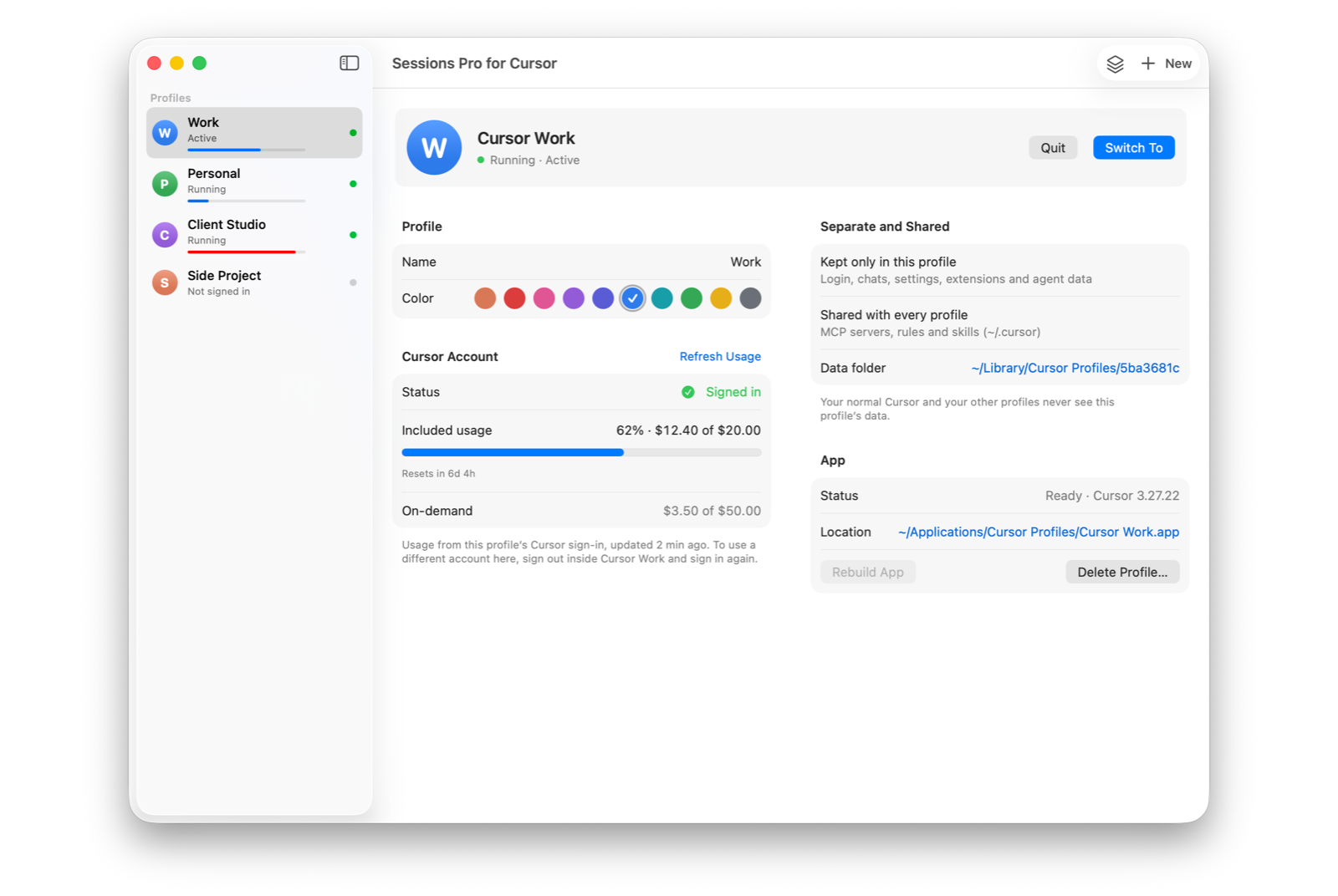
With Sessions Pro for Cursor, each account is its own copy of Cursor. On a Mac that's its own app with its own name and a lettered, coloured icon in the Dock, Spotlight and ⌘-Tab. On Windows it's its own Cursor window, titled with its account name, with a tray switcher.
Each copy starts signed out; you sign in once and it stays signed in. Signing in to one never signs out another, and on a Mac the sign-in returns to the copy that started it. Switching accounts is just bringing another app or window to the front.
Logging out vs a Cursor account switcher
| Sign out and in | --user-data-dir by hand | Sessions Pro for Cursor | |
|---|---|---|---|
| All accounts signed in at once | ✕ | ✓ | ✓ |
| Desktop app per account | ✕ | By hand | ✓ |
| Tell accounts apart at a glance | ✕ | Shared icon | ✓ Own icon or window title |
| No update message in extra copies | ✓ | Shows in every copy | ✓ |
| Cost | Free | Free | $15 one-time |
We make Sessions Pro for Cursor.
 Sessions Pro for Cursor
Free 1-hour preview · 14-day refund · 2 computers, Mac or PC
Want the free method in detail? See Cursor --user-data-dir, and where it breaks. Keeping a company seat next to your own plan? See Cursor work and personal accounts at the same time.
FAQ
How do I switch accounts in Cursor?
Open Cursor Settings, log out of your account, then log in again and sign in with the other account in your browser. To skip that every time, give each account its own copy of Cursor and keep them all signed in.
Can I be signed in to two Cursor accounts at once?
Yes, as long as each account has its own data folder: a second copy started with --user-data-dir, a second computer user, or an app that sets up a copy per account. One copy of Cursor holds one sign-in.
Does logging out of one account affect the others?
Not with Sessions Pro for Cursor. Every account is signed in to its own copy, so logging out of one never touches the others.
Do I have to sign out of my normal Cursor first?
No. Each account copy starts signed out and you sign in to it once. Your normal Cursor keeps its own sign-in, and cursor:// links keep opening it.
Is it allowed to have more than one Cursor account?
Cursor staff answered this on the Cursor forum in July 2026: “Having multiple accounts is totally fine. The only restriction is sharing a single account.” (forum.cursor.com) Use it for accounts you own, such as work, personal and client accounts. Every method on this page runs the official Cursor app, and Cursor's terms apply to each account.
Sessions Pro for Cursor is made by LEX GLOBAL IT S.R.L. and is not affiliated with, endorsed by or sponsored by Anysphere, Inc., the maker of Cursor. It runs the official Cursor app with accounts you own, and Cursor's terms apply to each account. Cursor is a trademark of Anysphere, Inc.
All your Cursor accounts. One computer.
Each account in its own app on a Mac, or its own window on Windows. $15 once, for 2 computers.