 Sessions Pro for Cursor
Short answer: Cursor has no built-in account switcher. Tools that fill the gap work in one of two ways: they swap the one signed-in account, so you still see one at a time, or they run a separate copy of Cursor per account, so all of them stay open. Sessions Pro for Cursor is the second kind, with its own app per account on a Mac and its own window on Windows.
Free 1-hour preview, starting once an account signs in to Cursor. For macOS 14 or later, or 64-bit Windows 10 or 11, with Cursor installed.
Does Cursor have an account switcher?
No. Cursor staff have said Cursor supports one signed-in account per installation, and the feature request for seamless account switching has been open since March 2025. Staff said in July 2026 that it's “not on the roadmap right now”. So the built-in way is still to log out and log in.
The two kinds of Cursor account switcher
- Swap the sign-in. Tools like the Cursor Account Switcher extension and Multi Cursor change which account your one Cursor is using. Quick, but still one account at a time.
- Separate windows by hand. The Userdata Switcher extension and scripts like cursor-profiles open Cursor with its own data folder per account. Free, and the catches of doing it by hand mostly remain.
- A copy per account. Sessions Pro for Cursor gives every account its own copy of Cursor, all signed in and open at once, and looks after them when Cursor updates.
A Cursor account switcher in your menu bar.
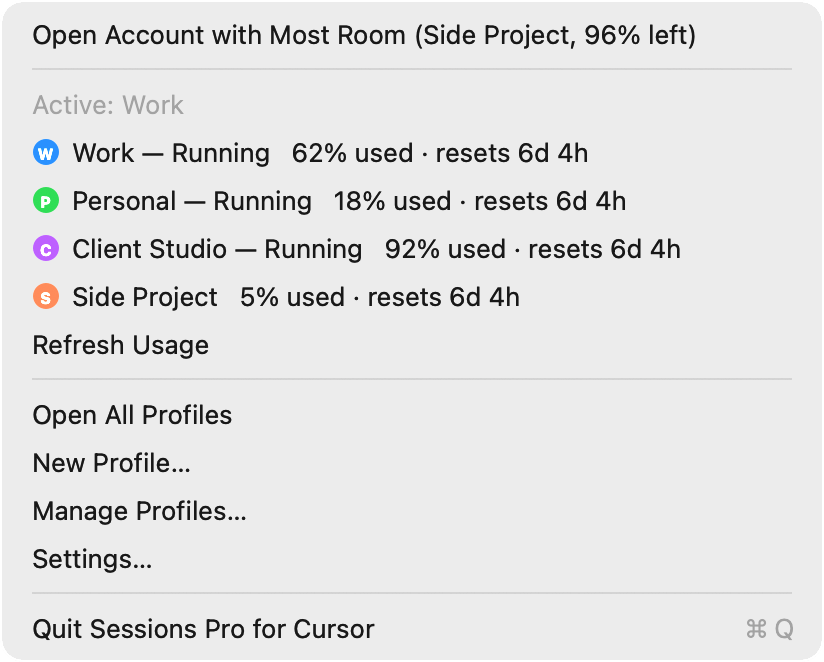
On a Mac, each account in Sessions Pro for Cursor is its own app with its own name and a lettered, coloured icon, so ⌘-Tab is your account switcher. The menu bar lists every account too: click one to bring it forward, or to open it if it isn't running. On Windows, each account opens in its own Cursor window, titled with its name, with a tray switcher.
Signing in to one account never signs out another, so there's nothing to swap and nothing to log back in to.
Cursor account switchers compared
| Swap extensions and tools | Windows or scripts by hand | Sessions Pro for Cursor | |
|---|---|---|---|
| All accounts open at once | ✕ | ✓ | ✓ |
| Separate chats, settings and extensions | Varies | ✓ | ✓ |
| Tell accounts apart at a glance | ✕ | Varies | ✓ Own icon or window title |
| Works on Mac and Windows | Varies | Varies | ✓ |
| Cost | Free | Free | $15 one-time |
We make Sessions Pro for Cursor.
 Sessions Pro for Cursor
Free 1-hour preview · 14-day refund · 2 computers, Mac or PC
Want the steps for two accounts? See how to run two Cursor accounts.
FAQ
Does Cursor have a built-in account switcher?
No. Cursor supports one signed-in account per installation, so the built-in way to change accounts is to log out and log in again.
Is there a Cursor account switcher extension?
Yes, there are free ones, such as Cursor Account Switcher and Userdata Switcher on the extension marketplace. We don't make them. Cursor staff have said they don't support or verify third-party switching extensions, so check what one does with your sign-in before installing it.
Can a Cursor account switcher keep two accounts open at once?
Only if each account has its own copy of Cursor with its own data folder. Tools that swap the sign-in show one account at a time. Sessions Pro for Cursor runs a copy per account, so all of them stay open.
Will switching accounts lose my chats?
With a copy per account, no: each account keeps its own chats, settings and extensions in its own folder, and nothing is swapped.
Is there a Cursor account switcher for Mac and Windows?
Yes. Sessions Pro for Cursor works on both: each account is its own app on a Mac, and its own window with a tray switcher on Windows. One licence covers 2 computers.
Sessions Pro for Cursor is made by LEX GLOBAL IT S.R.L. and is not affiliated with, endorsed by or sponsored by Anysphere, Inc., the maker of Cursor. It runs the official Cursor app with accounts you own, and Cursor's terms apply to each account. Cursor is a trademark of Anysphere, Inc.
All your Cursor accounts. One computer.
Each account in its own app on a Mac, or its own window on Windows. $15 once, for 2 computers.