 Sessions Pro for Cursor
Short answer: to check your Cursor usage, sign in to your Cursor dashboard, which shows the account you're signed in to. If you have more than one account, you repeat that for each. Sessions Pro for Cursor shows each account's included usage, on-demand spend and reset date in one place on a Mac.
Free 1-hour preview, starting once an account signs in to Cursor. For macOS 14 or later, or 64-bit Windows 10 or 11, with Cursor installed.
How to check your Cursor usage
- Open your Cursor dashboard. Go to cursor.com/dashboard and sign in to the account you want to check.
- Find your usage. It shows what this account has used in the current billing period.
- For another account, sign in again. The dashboard shows one account at a time, as does the Cursor app.
Cursor changes its menus and pages between releases, so the exact labels can move.
When does Cursor usage reset?
Included usage runs per billing period, so it resets when your account's billing period ends. Each account has its own billing dates, so a work and a personal account can reset on different days.
Monitor Cursor usage on multiple accounts.
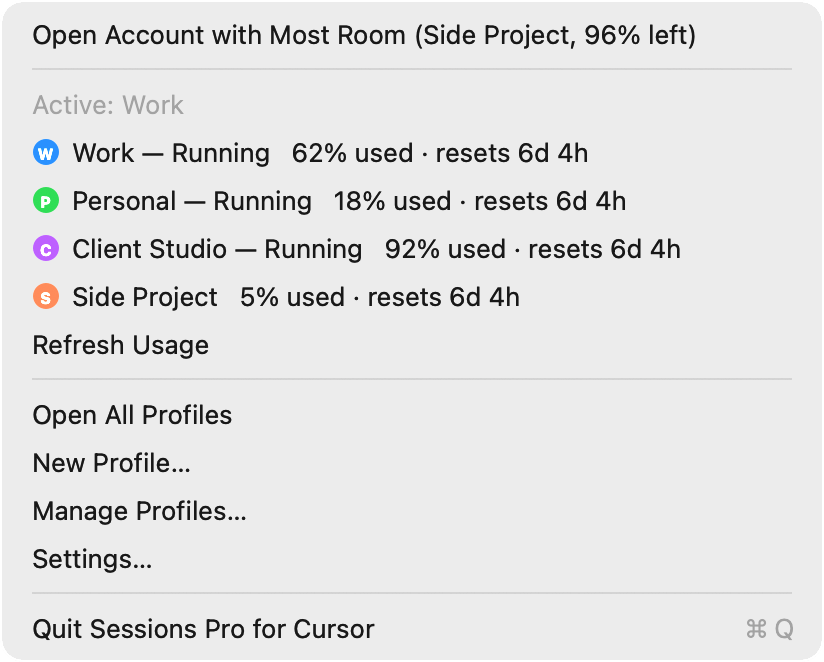
Sessions Pro for Cursor is a usage tracker for all your Cursor accounts: it monitors each one without you opening a dashboard for each. On a Mac, you see each account's included usage, on-demand spend and reset date in the app, and the account in front in the menu bar.
- All accounts at once. Percent used and time until reset for each one, side by side.
- Kept up to date. It checks every 5 minutes, and whenever you open the app.
- Private. It reads the numbers with each account's own sign-in, sends that sign-in only to Cursor, and stores nothing.
Ways to check Cursor usage compared
| Cursor dashboard | Sessions Pro for Cursor | |
|---|---|---|
| Usage for one account | ✓ | ✓ |
| Every account at once | ✕ | ✓ On a Mac |
| Reset date | ✓ | ✓ |
| Stays signed in to all accounts | ✕ | ✓ |
| Cost | Free | $15 one-time |
We make Sessions Pro for Cursor.
 Sessions Pro for Cursor
Free 1-hour preview · 14-day refund · 2 computers, Mac or PC
Have more than one account? See how to run two Cursor accounts.
FAQ
How do I check my Cursor usage?
Sign in to your Cursor dashboard at cursor.com/dashboard. It shows usage for the account you're signed in to, for the current billing period.
How do I see how much Cursor usage I have left?
Your Cursor dashboard shows what you've used this billing period. With Sessions Pro for Cursor on a Mac, you see each account's percent used and time until reset in the menu bar menu.
When does Cursor usage reset?
When your billing period ends. Each account has its own billing dates, so two accounts can reset on different days.
How can I monitor Cursor usage on multiple accounts?
Use a tracker that reads each account separately. Sessions Pro for Cursor shows each account's included usage, on-demand spend and reset date on a Mac, read with each account's own sign-in and sent only to Cursor.
Does a usage tracker see my code or chats?
Sessions Pro for Cursor doesn't. Its usage meter only asks Cursor for each account's usage numbers, and stores nothing.
Sessions Pro for Cursor is made by LEX GLOBAL IT S.R.L. and is not affiliated with, endorsed by or sponsored by Anysphere, Inc., the maker of Cursor. It runs the official Cursor app with accounts you own, and Cursor's terms apply to each account. Cursor is a trademark of Anysphere, Inc.
All your Cursor accounts. One computer.
Each account in its own app on a Mac, or its own window on Windows. $15 once, for 2 computers.